
Howdy Readers 🥰
In this newsletter, you’ll find:
😈 Your campaign needs an enemy
🔍 Microsoft Gives Marketers Better Data
👨💻 Tweet of the Day
If you’re new to Buyology then a hearty welcome to you, You’ve reached the right place alongside 50k+ amazing people, Before you forget, if someone forwarded this newsletter to you, don't forget to subscribe to our newsletter so you never miss out!
Together with Alison
Your Ad Looks Ready, But Is It Actually Built to Win?

Attention and budget mean nothing if your creative is structurally broken before it ever launches, so why pay to test bad ads?
Alison.ai Preflight Plus runs an instant CreativeAI Audit, validating your video against Google’s ABCD, Meta, TikTok, and LinkedIn frameworks, so you know if it’s flight-ready before you spend a dollar.
Here’s how it works:
✅ Upload your video creative
✅ Alison scores it against industry frameworks in 30 seconds
✅ Get an Adherence Score + specific AI fixes like “Enlarge logo” or “Speed up the hook”
The result? You kill weak assets early and spend media budget only on real contenders.
Brands using Alison are seeing results like +106% ThruPlays (Ferrara), +330% first-time purchases (Tango), and +101% ROI (Sciplay).
Want your next launch ready for take-off?
Run your free CreativeAI Audit now - no credit card.
😈 Your campaign needs enemy
Most performance creative solves a problem. None of it names a villain. That distinction is why ads that test well in isolation fall apart when scaled across channels. The individual pieces are optimized, but they are not in agreement. A villain brief fixes this at the architecture level.
1. Write the Villain Brief Before the Creative Brief
The villain brief is a one-page document written before any production begins. It names the specific, recognizable force your audience already resents, captures what that force is actively doing to your customer right now, and records exactly how your customer describes the situation when venting to someone they trust.
Three questions that anchor it:
What is the villain doing to your customer without your product in the picture?
What does your customer call it when complaining to someone they actually trust?
What argument does the villain make that keeps your customer from acting?
The answers govern every creative decision downstream.
2. Assign the Villain a Different Role in Each Channel
Once the villain is defined, the channel strategy becomes about where they appear and what they’re doing. In video, the villain’s behavior plays out in real time. Static creative shows the aftermath, the evidence already sitting on the table. Email is where you expose the logic the villain uses to rationalize your customer staying stuck.
Audit your current creative by channel. Wherever the product is doing all the work, the villain is absent. Replace product-led framing with villain-led framing in that slot and run a clean test against the control.
3. Test Villain Resonance Before You Test Hook Lines
Hook line testing is a symptom of not knowing which villain your audience recognizes. When the villain is correctly identified, multiple hooks work because the underlying tension is already real. The more valuable variable is which depiction of the villain drives the highest hold rate.
Run three villain variants in the same format: same product promise, same CTA, different villain framing. The version with the highest hold identifies the enemy. All future creative in that channel expands from that anchor.
Campaign coherence does not come from a brand bible or consistent visual language. It comes from a shared enemy. When every channel is fighting the same villain, the campaign reads as a single argument regardless of format.
🔍 Microsoft Gives Marketers Better Data
Microsoft rolled out a trio of updates aimed at helping marketers understand AI visibility, manage ecommerce catalogs, and target business buyers more precisely. The changes span Bing Webmaster Tools, Merchant Center, and Microsoft Ads.
The Breakdown:
AI Citation Insights - Bing’s AI Performance dashboard now includes Citation Share, showing your percentage of citations for a query, alongside new Intents, Topics, and Compare views. These additions make it easier to spot patterns in how Copilot and Bing AI reference your content.
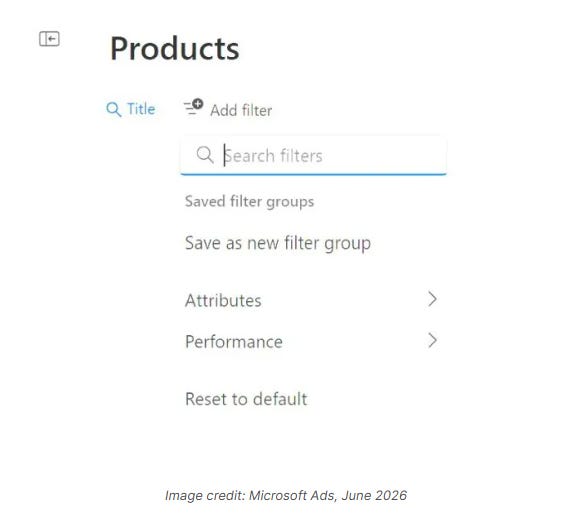
Product Feed Visibility - Microsoft launched Product Explorer, giving advertisers a searchable view of products that are serving, rejected, limited, or underperforming. Teams can filter by impressions, clicks, conversions, spend, CTR, and feed attributes from a single interface.
Faster Feed Optimization - Product Explorer also connects with Recommended Actions, helping advertisers identify issues and improve product eligibility faster. The goal is to reduce time spent jumping between diagnostics, feed tools, and campaign reports.
LinkedIn-Powered Targeting - Microsoft Ads now supports targeting and reporting by LinkedIn job seniority, including CXOs, VPs, Directors, Managers, and Entry-level professionals. Advertisers can use the filters for targeting or observation to better understand who is engaging and converting.
Whether you’re tracking AI citations, fixing product feed issues, or identifying decision-makers inside B2B campaigns, these updates provide more visibility into what drives performance and where optimization opportunities exist.
🗝️ Tweet of the Day

Advertise with Us
Wanna put out your message in front of over 50,000 best marketers and decision makers?
Checkout our Partner Kit here🤝
At Buyology, we care about our readers and want to provide the best possible experience. That's why we always look for ways to improve our content and connect with our audience. It would be amazing if you could hit us up with feedback about our content or absolutely anything, we are always up for a chat 🥰
Thanks for your support, We'll be back with more such content 🥳