
Howdy Readers 🥰
In this newsletter, you’ll find:
🚚 Google now says how fast “fast shipping” is, country by country
📢 Meta expands AI-powered ads, updates commercial terms and adds new Reels tools
👨💻 Tweet of the day
If you’re new to Buyology then a hearty welcome to you, You’ve reached the right place alongside 50k+ amazing people, Before you forget, if someone forwarded this newsletter to you, don't forget to subscribe to our newsletter so you never miss out!
🚚 Google now says how fast “fast shipping” is, country by country
On October 21, Search Engine Roundtable reported that Google’s Merchant Center documentation now states how many days a listing needs to qualify for fast shipping in each market:
Japan and New Zealand: 1 day
India: 2 days
United States, United Kingdom, Canada and Australia: 3 days
Brazil: 4 days
That gives every store selling through Google a clear target. Whether you hit it depends on two numbers in your shipping settings: handling time and transit time.
Step 1: Add up your real delivery days
For each country you ship to, write down:
Handling time: days from order to dispatch
Transit time: days from dispatch to the customer’s door
A US store that ships next day with two-day ground transit totals three days, right at the line. One that needs two days to pack and ships ground in three totals five.
Step 2: Close the gap where it’s cheapest
Cut handling time first. Moving dispatch from two days to one often costs less than paying for faster carriers. Look at pick-and-pack staffing and order cutoff times.
Set an order cutoff time. Orders placed late in the day usually ship the next day. Stating a realistic cutoff keeps delivery estimates honest.
Use regional transit times. If most of your customers sit near your warehouse, setting transit by region can show faster delivery to the shoppers who’ll actually get it.
Step 3: Stay honest in November
Carriers slow down around Black Friday. If your real delivery time stretches, update handling or transit settings to match. In my judgment, a delivery promise you miss in peak week does more harm than a slower promise you keep.
Step 4: Prioritize your fastest products
If only some products ship fast, such as in-stock items from your main warehouse, give them more prominence in Shopping campaigns during the holiday weeks. Products with long lead times or made-to-order items are better left out of the fast-shipping push.
Step 5: Check by country
If you sell abroad, run the same math for each market. A store that qualifies at home may miss Canada’s 3-day line because of cross-border transit.
What to track
Share of products that meet each country’s threshold
Actual delivery days against the stated estimate
Shopping conversion rate before and after any change
Your first check
Open your Merchant Center shipping settings and add handling time to transit time for your main market. If the total is above the line, start with handling time.
Together with Insense
Your BFCM Creator Calendar is Already Mapped

Still sourcing creators when your Black Friday ads should be running? Every delay leaves less time to test what actually sells before your biggest spending weeks.
Insense’s free BFCM + Q5 Creator Marketing Playbook gives marketers a week-by-week plan from September through January, so every creator campaign starts with a clear deadline and purpose.
Inside, you’ll find:
A week-by-week August-to-January calendar showing when to secure permissions, test content, scale winning creators, and move into Q5.
A practical creator scorecard using conversions, engagement quality, and reliability, so November budgets back proven performers over follower counts.
Q5 action plan covering licence extensions, January creative, and the recommended 10–15% budget reserve for the lower-cost post-holiday window.
You’ll also get benchmarks for creator-handle ads, modular UGC testing, live shopping, hook rates, and creative volume, helping your team set measurable targets before spending rises.
📢 Meta expands AI-powered ads, updates commercial terms and adds new reels tools
Meta is introducing new product browsing and AI-generated landing page experiences across Facebook and Instagram, while updating its commercial terms and expanding video creation tools for creators.
The Breakdown:
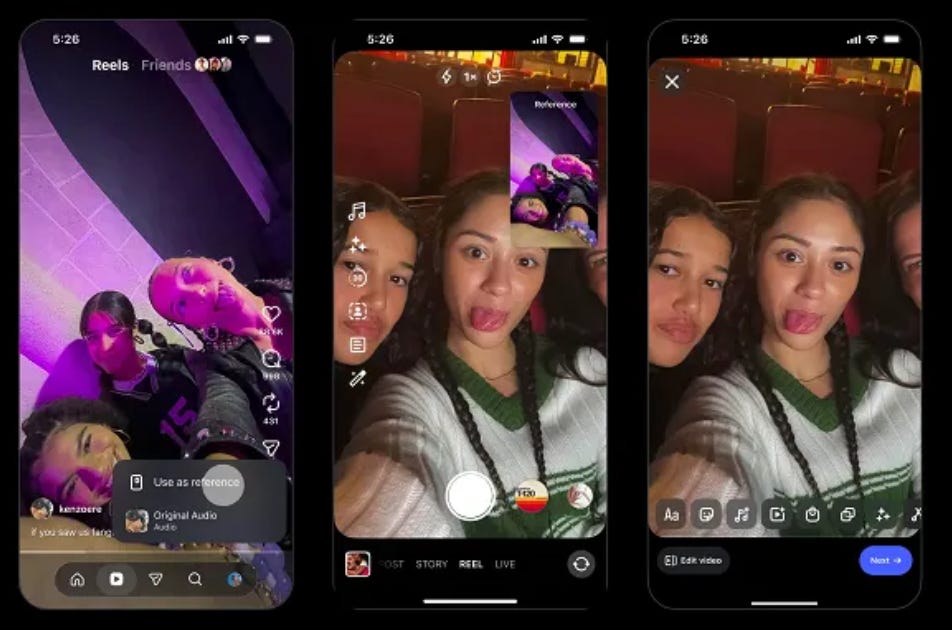
Instagram Adds Reels Creation Tools - Meta’s Edits app now supports clickable audio links, audience trend insights, and reusable style kits. Instagram also introduced reference Reels for iOS creators while removing linked Reels series starting October 28.
Meta Makes In-App Product Browsing Default - Starting October 28, Meta will automatically enable personalized product browsing pages for eligible ads unless advertisers opt out. A test involving 117,000 advertisers showed an average 3% increase in conversions.
AI-Generated Landing Pages Raise Tracking Concerns - Meta is testing AI-generated landing pages on fewer than 5% of ad impressions. Because these pages operate outside advertisers’ websites, standard GA4 and Meta Pixel tracking may miss user activity and create attribution gaps.
Meta’s New Terms Raise AI Training Questions - From October 30, Meta’s updated terms could allow AI training on business-linked website content. Meta says its crawling practices and existing protections remain unchanged.
Meta’s updates are bringing more product discovery and creative activity inside its platforms, potentially giving advertisers new conversion opportunities while complicating independent measurement. Businesses should review browsing settings, verify conversion tracking, and understand the updated commercial terms before the changes take effect.
🗝️ Tweet of the Day

Advertise with Us
Wanna put out your message in front of over 50,000 best marketers and decision makers?
Checkout our Partner Kit here🤝
At Buyology, we care about our readers and want to provide the best possible experience. That's why we always look for ways to improve our content and connect with our audience. It would be amazing if you could hit us up with feedback about our content or absolutely anything, we are always up for a chat 🥰
Thanks for your support, We'll be back with more such content 🥳