
Howdy Readers 🥰
In this newsletter, you’ll find:
📒 Demand gen costs can now shift for 60 days. keep your own ledger
📢 Google Ads expands customer targeting controls while automatically adding creative assets to PMax
👨💻 Tweet of the day
If you’re new to Buyology then a hearty welcome to you, You’ve reached the right place alongside 50k+ amazing people, Before you forget, if someone forwarded this newsletter to you, don't forget to subscribe to our newsletter so you never miss out!
Together with Omnisend
Imagine beating a month’s email revenue with one send

You’d probably double-check the numbers.
Enflow Digital did exactly that for a skincare client ahead of BFCM. One plain-text email sent through Omnisend to 1,676 recipients generated nearly $18,000, beating the previous month’s broad-audience campaigns combined.
Omnisend helped the team find the right customers to send it to. Its segmentation and MCP capabilities let them uncover purchase patterns in minutes.
Co-founder Karolina shares how they pulled it off with Omnisend, from choosing the audience to making the offer worth opening. Worth a read (or a watch) before you hit send on your own BFCM campaigns.
New to Omnisend? It’s an email and SMS marketing platform for ecommerce used by more than 150,000 brands, generating an average of $79 for every $1 spent. Migration is free and takes up to five business days.
📒 Demand gen costs can now shift for 60 days. Keep your own ledger
In mid-October, reports noted that Google Ads Help now says Demand Gen cost adjustments can apply for “up to 60 days,” up from the three weeks previously reported.
Here’s how they work, according to that coverage. For qualifying new Demand Gen campaigns using target CPA or target ROAS, Google may lower the final cost if conversions fall short of what the system predicted. Adjustments can start within five days of launch.
There’s no separate credit, notification or line item. The adjusted cost simply appears in reporting, sometimes days later.
Why that matters in Q4
If you launch a Demand Gen campaign in early November, the cost you see on day three may not be the cost you see on day ten. Decisions made on early numbers can be wrong in either direction.
Who qualifies
Eligibility depends on factors such as account age, activity history, tracking setup and bidding and budget practices. It isn’t guaranteed, there’s no published minimum and the window can end early if a campaign hits a duration or cost limit.
So assume it might apply, and plan as if it might not.
Build a daily ledger
From launch day, record these numbers every day in your own sheet:
Spend as shown that day
Conversions and conversion value
Bid strategy and target
Budget
Then re-pull the same days a week later. Any difference in spend is an adjustment.
Judge on settled numbers
Wait until costs for a given week stop changing before you call a campaign’s performance. In my judgment, give each week of data about seven days to settle.
Keep settings steady early
Frequent target or budget changes in the first weeks make it harder to tell what moved results. Eligibility also depends partly on bidding and budget practices, so steady settings are the safer choice.
Time your launch
If you want a Demand Gen campaign stable by Black Friday, launch it by early November. That leaves a few weeks of settled data before the peak.
Report clearly
When you share results, note which figures came before and after adjustment. Finance will notice if last week’s cost per acquisition quietly changes.
What to track
Daily spend, first pull against re-pull
Settled cost per acquisition by week
Whether adjustments appeared at all
Set up the ledger before the campaign goes live. The first five days are the ones you’ll most want to compare later.
📢 Google Ads expands customer targeting controls while automatically adding creative assets to PMax
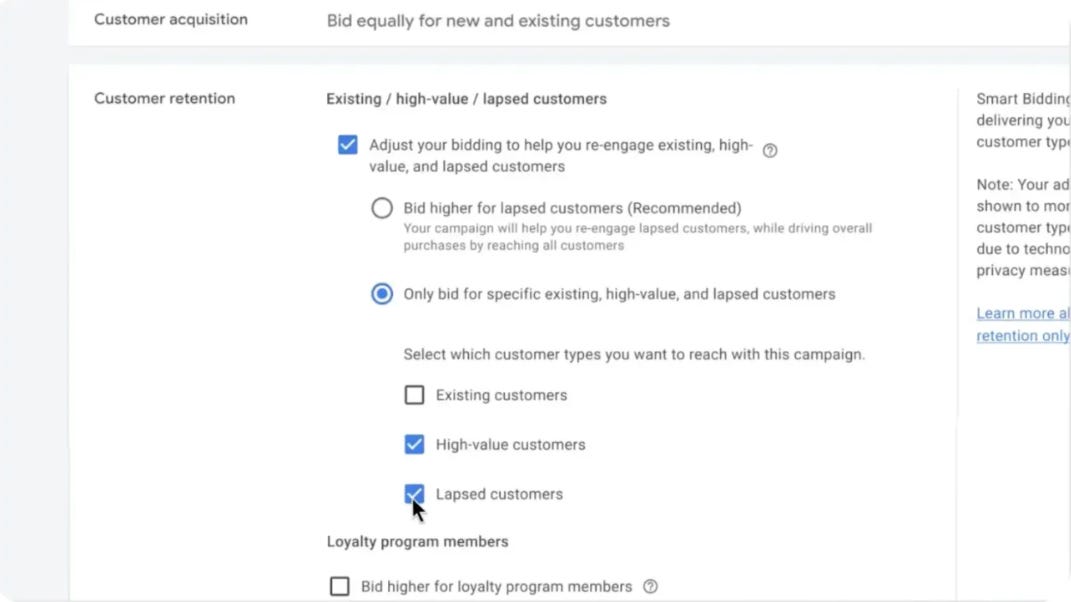
Google Ads is introducing new customer lifecycle bidding options across Performance Max, Search, and Shopping campaigns, while making automated video and landing page image sourcing the default for eligible PMax campaigns.
The Breakdown:
Google Introduces High-Value Customer Bidding - Shopping campaigns are gaining New Customer High Value Mode, allowing advertisers to bid more aggressively for first-time customers predicted to generate higher spending.
New Retention Modes Target Existing Customers - PMax, Search and Shopping campaigns are getting Re-engagement, Loyalty and Retention Only modes, enabling advertisers to adjust bidding for lapsed customers, loyalty members and selected customer segments.
Percentage-Based Bid Boosts Expand - Advertisers can now apply percentage-based bid boosts across Search, Shopping, PMax and Demand Gen, allowing adjustments to scale with purchase value rather than relying on fixed amounts.
PMax Automatically Sources Videos and Images - Google is making sourced videos opt-out, while landing page image sourcing becomes enabled by default for all new PMax campaigns starting December 4, even when account-level dynamic images are disabled.
Google’s updates give advertisers more control over customer acquisition and retention bidding while increasing automation in creative selection. Advertisers will need accurate customer segmentation data and should review PMax asset optimization settings to prevent unauthorized or unsuitable images and videos from appearing in campaigns.
🗝️ Tweet of the Day

Advertise with Us
Wanna put out your message in front of over 50,000 best marketers and decision makers?
Checkout our Partner Kit here🤝
At Buyology, we care about our readers and want to provide the best possible experience. That's why we always look for ways to improve our content and connect with our audience. It would be amazing if you could hit us up with feedback about our content or absolutely anything, we are always up for a chat 🥰
Thanks for your support, We'll be back with more such content 🥳